
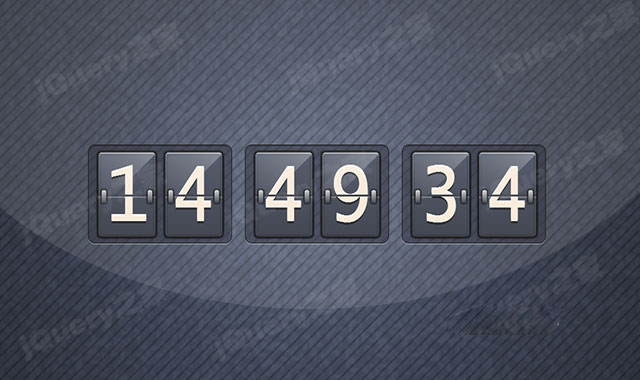

这是一款jQuery和CSS3精美翻页式电子时钟特效。该电子时钟使用CSS3渐变和transform来制作翻页电子时钟的外观,然后通过jquery代码来驱动电子时钟的翻页显示时间效果。
使用方法
在页面中引入jquery和style.css文件。
HTML结构
该翻页式电子时钟的HTML结构如下。
初始化插件
在页面DOM元素加载完毕,通过下面的方法来驱动电子时钟的翻页显示时间效果。
var CHANCE_SPEC, x, y;

CHANCE_SPEC = 60;
x = 0;
y = 0;

function rand(min, max) {
  return Math.floor(Math.random() * (max - min + 1) - min);
}

function drawSpec(data, x, y, w) {
    var index;

    index = (x + y * w) * 4;

    data.data[index + 0] = 0;
    data.data[index + 1] = 0;
    data.data[index + 2] = 0;
    data.data[index + 3] = 30;
}

function drawPattern(canvas, ctx, data) {
  var w, h;
  w = canvas.width;
  h = canvas.height;
  while (x < w) {
    if (rand(1, 100) < CHANCE_SPEC) {
      drawSpec(data, x, y, w);
    }
    x++;
  }
  if (x === w) {
    x = 0;
    y++;
  }
  if (y === h) {
    ctx.putImageData(data, 0, 0);
    return;
  }
  drawPattern(canvas, ctx, data);
}

function main() {
  var canvas, ctx, data;

  console.log('starting1');
  canvas = document.getElementById('my-canvas');
  ctx = canvas.getContext('2d');
  data = ctx.getImageData(0, 0, canvas.width, canvas.height);
  drawPattern(canvas, ctx, data);
  updateTime();
}

function updateTime() {
  var currentTime, seconds, minutes, hours, times, i;
  currentTime = new Date();
  times = {
    'second': currentTime.getSeconds(),
    'minute': currentTime.getMinutes(),
    'hour': currentTime.getHours()
  };
  for (type in times) {
    if (times.hasOwnProperty(type)) {
      setTimes(type, timeToString(times[type]));
    }
  }
  setTimeout(updateTime, 1000);
}

function timeToString(currentTime) {
  var t;
  t = currentTime.toString();
  if (t.length === 1) {
    return '0' + t;
  }
  return t;
}

function getPreviousTime(type) {
  return $('#' + type + '-top').text();
}

function setTimes(type, timeStr) {
  setTime(getPreviousTime(type + '-tens'),
    timeStr[0], type + '-tens');
  setTime(getPreviousTime(type + '-ones'),
    timeStr[1], type + '-ones');
}

function setTime(previousTime, newTime, type) {
  if (previousTime === newTime) {
    return;
  }
  setTimeout(function() {
    $('#' + type + '-top').text(newTime);
  }, 150);
  setTimeout(function() {
  $('.bottom-container',
    $('#' + type + '-bottom')).text(newTime);
  }, 365);
  animateTime(previousTime, newTime, type);
}

function animateTime(previousTime, newTime, type) {
  var top, bottom;
  top = $('#top-' + type + '-anim');
  bottom = $('#bottom-' + type + '-anim');
  $('.top-half-num', top).text(previousTime);
  $('.dropper', bottom).text(newTime);
  top.show();
  bottom.show();
  $('#top-' + type + '-anim').css('visibility', 'visible');
  $('#bottom-' + type + '-anim').css('visibility', 'visible');
  animateNumSwap(type);
  setTimeout(function() {
    hideNumSwap(type);
  }, 365);
}

function animateNumSwap(type) {
  $('#top-' + type + '-anim').toggleClass('up');
  $('#bottom-' + type + '-anim').toggleClass('down');
}

function hideNumSwap(type) {
  $('#top-' + type + '-anim').toggleClass('up');
  $('#bottom-' + type + '-anim').toggleClass('down');
  $('#top-' + type + '-anim').css('visibility', 'hidden');
  $('#bottom-' + type + '-anim').css('visibility', 'hidden');
}

$(document).ready(main);


window.requestAnimFrame = (function(callback){
    return window.requestAnimationFrame ||
        window.webkitRequestAnimationFrame ||
        window.mozRequestAnimationFrame ||
        window.oRequestAnimationFrame ||
        window.msRequestAnimationFrame ||
        function(callback){ window.setTimeout(callback, 1000 / 60); }
})();
该jQuery和CSS3精美翻页式电子时钟特效的codepen地址为:https://codepen.io/swartkrans/pen/gaode









 粤公网安备 44011102002787号