
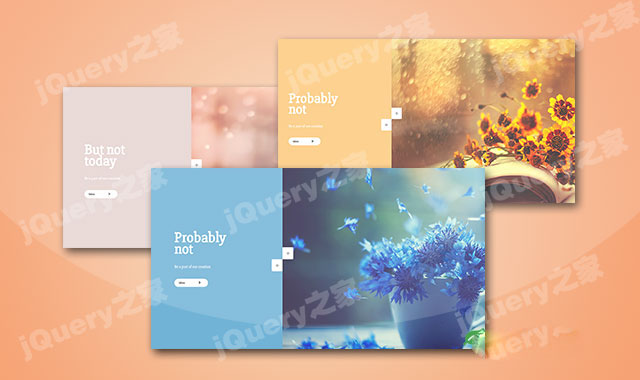

这是一款js左右两侧分屏动画轮播图特效。该轮播图特效中,图片和描述文本分居屏幕的两侧,在鼠标上下滚动时,图片和描述文本做上下相对运动,效果非常炫酷。
使用方法
在页面中引入style.css文件。
HTML结构
该轮播图的html结构如下:


javaScript
然后在页面DOM元素加载完毕之后,通过下面的方法来初始化该轮播图。
var Lslide      = document.querySelectorAll('.Lslide'),
    Rslide      = document.querySelectorAll('.Rslide'),
    control     = document.querySelectorAll('.oncontrol'),
    slideHeight = document.querySelector('.wrapper').clientHeight,
    color = ['#fdc97c', '#e5d3d0', '#71b3d6'],
    index = 0;


function init() {
    slideHeight = document.querySelector('.wrapper').clientHeight;
    for (i = 0; i < Lslide.length; i++) {
        Lslide[i].style.backgroundColor = color[i];
        Lslide[i].style.top = -slideHeight * i + "px";
        Rslide[i].style.top = slideHeight * i + "px";
    }
}
init()
window.addEventListener('resize', function(){
    init()
});

function moveToTop() {

    index++;
    for (el = 0; el < Lslide.length; el++) {
        Lslide[el].style.top = parseInt(Lslide[el].style.top) + slideHeight + "px";
        Rslide[el].style.top = parseInt(Rslide[el].style.top) - slideHeight + "px";
    }

    if (index > Lslide.length-1) {
        index = 0;
        for (el = 0; el < Lslide.length; el++) {
            Lslide[el].style.top = -slideHeight * el + "px";
            Rslide[el].style.top = slideHeight * el + "px";
        }
    }
}

function moveToBottom() {
    index--;
    for (el = 0; el < Lslide.length; el++) {
        Lslide[el].style.top = parseInt(Lslide[el].style.top) - slideHeight + "px";
        Rslide[el].style.top = parseInt(Rslide[el].style.top) + slideHeight + "px";

    }
    if (index < 0) {
        index = Rslide.length-1;
        for (el = 0; el < Lslide.length; el++) {
            Lslide[el].style.top = parseInt(Lslide[el].style.top) + slideHeight * Lslide.length + "px";
            Rslide[el].style.top = parseInt(Rslide[el].style.top) - slideHeight * Rslide.length + "px";
        }
    }
}

function transition() {
    for (t = 0; t < Lslide.length; t++) {
        Lslide[t].style.transition = "all 0.8s";
        Rslide[t].style.transition = "all 0.8s";
    }
}


for (t = 0; t < control.length; t++) {
    control[t].addEventListener("click", function() {

        if (this.classList.contains('control-top')) {
            moveToTop()
        }
        if (this.classList.contains('control-bottom')) {
            moveToBottom()
        }

        transition()

    });
}

var wheeling;
function mousemouve(e) {

    clearTimeout(wheeling);
    e.preventDefault();
    var e = window.event || e;
    var delta = Math.max(-1, Math.min(1, (e.wheelDelta || -e.detail)));

    wheeling = setTimeout(function() {
        wheeling = undefined;
        if (delta === 1) {
            moveToTop()
        }
        if (delta === -1) {
            moveToBottom()
        }
    }, 100);

    transition()
}

document.addEventListener("mousewheel", mousemouve);
document.addEventListener("DOMMouseScroll", mousemouve);
该js左右两侧分屏动画轮播图特效的codepen地址为:https://codepen.io/GrandvincentMarion/pen/NaEELP





 粤公网安备 44011102002787号